
Site Survey Check list
- Server Firmware Version all servers need to be at the same firmware version the latest version is 5.7.0-8.
- The total number of IP devices that are connected to each server.
- Access to the network switches and locations
- Access to the Switchboard PC admin passwords
- Each block has access to a single dedicated network
- Take a back-up before and after any configuration changes
Multi server Configuration
All servers need to be in the same subnet.
The subnet needs to be configured to cover the total number of devices across all the servers
If each server has 500 IP devices and there are 4 servers then you will need a subnet of at least 2000 IP address.
A subnet of 255.255.248.0 also referred to as a /21 subnet
Using a starting IP of 10.10.8.0 this will give you a host range of 2048 IP addresses.
Server 1-Network settings would be:-
Server IP 10.10.8.1/21 IP range 10.10.8.2 to 10.10.9.253
Server 2-Network settings would be:-
Server IP 10.10.10.1/21 IP range 10.10.10.2 to 10.10.11.253
Server 3-Network settings would be:-
Server IP 10.10.12.1/21 IP range 10.10.12.2 to 10.10.13.253
Server 4-Network settings would be:-
Server IP 10.10.14.1/21 IP range 10.10.14.2 to 10.10.15.253
Network Broadcast address would be 10.10.15.255
Please note the DHCP must be blocked on all the servers
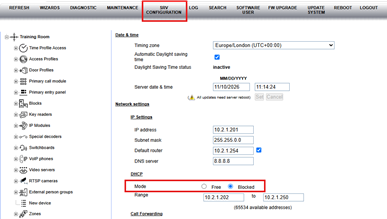
After a server network change then all IP devices will need to be rebooted
Specific network requirements for IPerVoice are as follows:
- IGMPv2 or IGMPv3 Multicast Service must be enabled.
- Packet Inspection must be disabled
- QOS (Quality Of Service) must be disabled
- STP (Spanning Tree Protocol) must be disabled
- The following ports must be open and not restricted –
TCP ports 2049, 51234, 5060, 50118, 3306, 13451 to 13460, 111, 80, 433, 41365, 22, 918 & 40279. - UDP ports 32768, 2049, 514, 32771, 34956, 917, 34839, 67, 5060, 69, 975, 111, 123.
- Multicast must be enabled on 238.0.0.200:55000 and on 239.255.0.200 (all ports).
- TCP/UDP ports used for Internet access (if any) TCP:5060,6060 UDP:5060,6060.
- Bandwidth per end point (Kbps) 2500 for upload and 10000 for download.