
The call forwarding function can be configured in 2 ways:
- With CallMe Manager – recommended for large sites with a building manager
- Without CallMe Manager – smaller sites without a building manager
In both cases the system must be connected to a router and have access to the internet. The resident will also need a smartphone with the Urmet CallMe App. The resident will also need to register for an Urmet Cloud Account to use the feature.
Using the IPerCom Installer Tool software, ensure that the call forwarding feature is enabled in the IPerCom system configuration file.
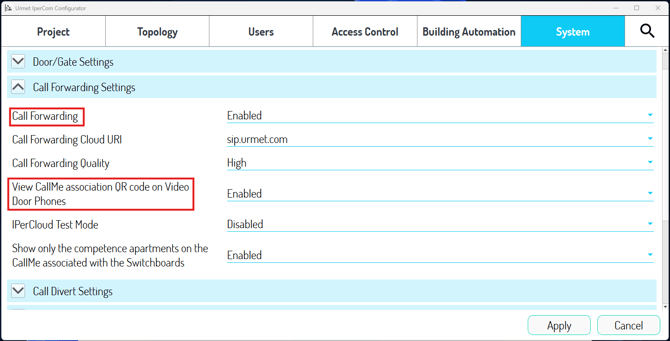
Without CallMe Manager
If 'View CallMe association QR code on Video Door Phones' is set to 'Enabled' the resident can setup call forwarding by scanning a QR code found in the apartment monitor settings.
With CallMe Manager - Generating invite letters
If you do want to use the CallMe Manager Software to administer the system, ensure that 'View CallMe association QR code on Video Door Phones' is set to disabled.
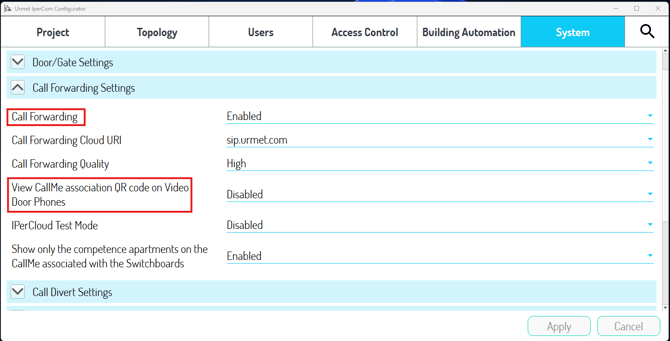
NOTE: In older versions of the IPerCom Installer tool ,'View CallMe association QR code on Video Door Phones' may be called 'CallMe Manager Support' instead.
After making any changes in the IPerCom Installer tool don't forget to save and apply changes while the site is connected. This makes sure that any changes are applied to all the devices in the system.
The building manager or installer can then use the CallMe Manager software to generate invite letters with QR codes for residents.
With CallMe Manager - Setup call forwarding from the invite letter
The resident can download the CallMe app and scan the QR code on the invite letter to setup call forwarding.
Call Forwarding has now been setup. For more information please refer to the full IPerCom Manuals for your specific products. Full details on call forwarding setup can be found on page 372 of the IPerCom manual - https://support.urmet.co.uk/ipercom-user-manual-download